How to Reopen a Closed-Lost Opportunity in Salesforce

Reopening a closed-lost opportunity in Salesforce sounds simple.
Change the stage. Move on.
In reality, it’s one of the most debated RevOps questions:
- Should we reopen or clone?
- Will this distort win-loss reporting?
- Does this inflate pipeline?
- How does this affect forecasting?
Done incorrectly, reopening a deal can damage reporting integrity.
Done correctly, it can recover 10–20% of lost pipeline.
Here’s how to do it properly.
When Should You Reopen a Closed-Lost Opportunity?
Reopen only when buying motion has resumed.
Valid triggers include:
- Budget freeze lifted
- New stakeholder restarts evaluation
- Champion leaves and successor re-engages
- Competitor contract nearing expiration
- Account actively researching your category again
Do not reopen because:
- Someone opened a marketing email
- A contact downloaded a guide
- You “want to try again”
If there is no active evaluation, log a task; don’t reopen pipeline.
How to Reopen a Closed-Lost Opportunity in Salesforce (Step-by-Step)
Step 1: Confirm Stage Editing Permissions
Some Salesforce orgs restrict movement out of Closed-Lost.
To verify:
Setup → Object Manager → Opportunity → Fields & Relationships → Stage
Ensure:
- Closed-Lost is editable
- Backward stage movement is allowed
- Validation rules do not block reopening
If restricted, coordinate with RevOps.
Step 2: Edit the Opportunity Record
- Open the Opportunity
- Click “Edit”
- Change Stage from Closed-Lost to an active stage (e.g., Discovery or Qualification)
- Update the following fields:
- Close Date
- Amount (if changed)
- Probability
- Next Step
Save.
Do not forget to update the close date. Leaving the original date will distort forecasting.
Step 3: Preserve Historical Context
Never overwrite your original loss data.
Best practice:
- Keep original Closed-Lost reason intact
- Add a note explaining the trigger event
- Log a new activity documenting why it was reopened
Example note:
“Reopened due to new VP Ops initiating vendor evaluation after budget approval.”
This protects win-loss analysis later.
Reopen vs Clone: What’s the Right Approach?
This is where most teams get it wrong.
Reopen the original opportunity if:
- Less than 3–6 months have passed
- Same buying committee remains
- Same project scope
- Same budget cycle
Clone the opportunity if:
- 6+ months have passed
- New stakeholders now own decision
- Expanded scope or new evaluation
- New fiscal year or new budget
Cloning preserves historical reporting and prevents artificial win-rate inflation.
Many RevOps teams prefer cloning for clean metrics.
How Reopening Impacts Reporting and Forecasting
Reopening affects:
- Sales cycle length
- Win-loss reporting
- Forecast rollups
- Close rate metrics
Common issues:
• Inflated pipeline from stale deals
• Extended average sales cycle length
• Confusion in win-loss attribution
To prevent distortion:
- Option A: Create a custom field “Reopened Opportunity”
- Option B: Store “Original Close Date” in a custom field
- Option C: Clone instead of reopen
Clean data builds trust with leadership.
The Real Problem: Timing
The hardest part of reopening isn’t clicking “Edit.”
It’s knowing when to reopen.
Most teams manually audit closed-lost quarterly.
By then, timing is gone.
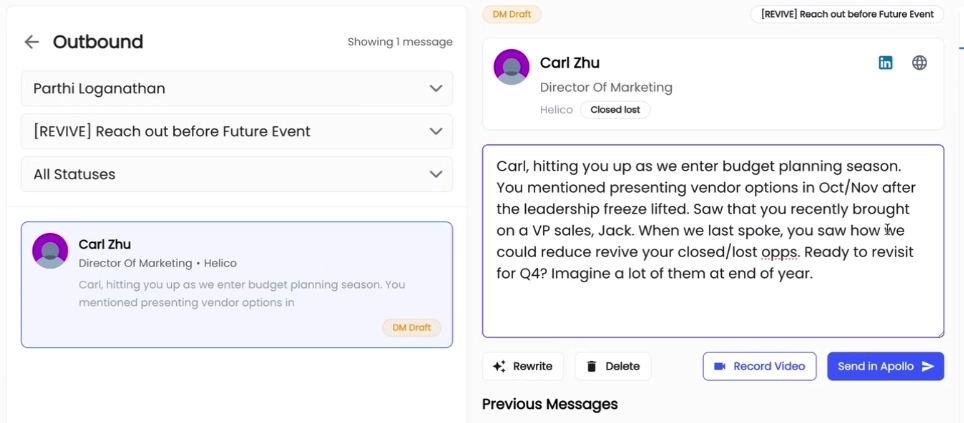
Letterdrop can make closed-lost revival automatic and with context. We use AI to analyze:
- CRM deal data (including Salesforce)
- Call notes and transcripts
- Emails
- Stakeholders involved
- Objections and blockers
We identify what stopped the deal, what needs to change, and then track for those changes.
If nothing has changed, we don’t push outreach.
If something has changed, we trigger highly contextual follow-ups at the right time.
When buying motion resumes, reps are alerted with context explaining why.
Subscribe to newsletter
No-BS GTM strategies to build more pipeline in your inbox every week
Related Reading
Some other posts you might find helpful